


2024 Valid XK0-005 Exam Updates - 2024 Study Guide
XK0-005 Certification - The Ultimate Guide [Updated 2024]
NEW QUESTION # 18
A junior administrator is setting up a new Linux server that is intended to be used as a router at a remote site.
Which of the following parameters will accomplish this goal?
- A.

- B.

- C.

- D.

Answer: D
Explanation:
Explanation
The parameter net.ipv4.ip_forward=1 will accomplish the goal of setting up a new Linux server as a router.
This parameter enables the IP forwarding feature, which allows the server to forward packets between different network interfaces. This is necessary for a router to route traffic between different networks. The parameter can be set in the /etc/sysctl.conf file or by using the sysctl command. This is the correct parameter to use to accomplish the goal. The other options are incorrect because they either do not exist(net.ipv4.ip_forwarding or net.ipv4.ip_route) or do not enable IP forwarding (net.ipv4.ip_forward=0). References: CompTIA Linux+ (XK0-005) Certification Study Guide, Chapter 12:
Managing Network Connections, page 382.
NEW QUESTION # 19
A Linux administrator wants to set the SUID of a file named dev_team.text with 744 access rights. Which of the following commands will achieve this goal?
- A. chmod -c 744 dev_team.txt
- B. chmod 4744 dev_team.txt
- C. chmod 744 --setuid dev_team.txt
- D. chmod -v 4744 --suid dev_team.txt
Answer: B
Explanation:
Explanation
The command that will set the SUID of a file named dev_team.txt with 744 access rights is chmod 4744 dev_team.txt. This command will use the chmod utility to change the file mode bits of dev_team.txt. The first digit (4) represents the SUID bit, which means that when someone executes dev_team.txt, it will run with the permissions of the file owner. The next three digits (744) represent the read, write, and execute permissions for the owner (7), group (4), and others (4). This means that the owner can read, write, and execute dev_team.txt, while the group and others can only read it.
The other options are not correct commands for setting the SUID of a file with 744 access rights. The chmod
744 --setuid dev_team.txt command is invalid because there is no --setuid option in chmod. The chmod -c 744 dev_team.txt command will change the file mode bits to 744, but it will not set the SUID bit. The -c option only means that chmod will report when a change is made. The chmod -v 4744 --suid dev_team.txt command is also invalid because there is no --suid option in chmod. The -v option only means that chmod will output a diagnostic for every file processed. References: CompTIA Linux+ (XK0-005) Certification Study Guide, Chapter 8: Managing Users and Groups; chmod(1) - Linux manual page
NEW QUESTION # 20
A systems administrator needs to check if the service systemd-resolved.service is running without any errors. Which of the following commands will show this information?
- A. systemctl status systemd-resolved.service
- B. systemctl show systemd-resolved.service
- C. systemctl mask systemd-resolved.service
- D. systemctl enable systemd-resolved.service
Answer: A
NEW QUESTION # 21
A systems administrator created a new directory with specific permissions. Given the following output:
# file: comptia
# owner: root
# group: root
user: : rwx
group :: r-x
other: :---
default:user :: rwx
default:group :: r-x
default:group:wheel: rwx
default:mask :: rwx
default:other ::-
Which of the following permissions are enforced on /comptia?
- A. Other users can create files in /comptia.
- B. Members of the wheel group can read files in /comptia.
- C. Only root can create files in /comptia.
- D. Newly created files in /comptia will have the sticky bit set.
Answer: B
Explanation:
Explanation
The output shows the file access control list (FACL) of the /comptia directory, which is an extension of the standard Linux permissions that allows more fine-grained control over file and directory access1. The FACL consists of two parts: the access ACL and the default ACL. The access ACL applies to the current object, while the default ACL applies to the objects created within the directory2.
The access ACL has three entries: user, group, and other. These are similar to the standard Linux permissions, but they can be specified for individual users or groups as well. The user entry shows that the owner of the directory (root) has read, write, and execute permissions (rwx). The group entry shows that the group owner of the directory (root) has read and execute permissions (r-x). The other entry shows that all other users have no permissions (-).
The default ACL has five entries: user, group, group:wheel, mask, and other. These are applied to any files or directories created within /comptia. The user entry shows that the owner of the new object will have read, write, and execute permissions (rwx). The group entry shows that the group owner of the new object will have read and execute permissions (r-x). The group:wheel entry shows that the members of the wheel group will have read, write, and execute permissions (rwx) on the new object. The mask entry shows that the maximum permissions allowed for any user or group are read, write, and execute (rwx). The other entry shows that all other users will have no permissions (-) on the new object.
Therefore, based on the FACL output, members of the wheel group can read files in /comptia, as they have read permission on both the directory and any files within it. Option B is incorrect because the sticky bit is not set on /comptia or any files within it. The sticky bit is a special permission that prevents users from deleting or renaming files that they do not own in a shared directory3. It is symbolized by a t character in the execute position of others. Option C is incorrect because other users cannot create files in /comptia, as they have no permissions on the directory or any files within it. Option D is incorrect because root is not the only user who can create files in /comptia. Any user who has write permission on the directory can create files within it, such as members of the wheel group.
NEW QUESTION # 22
A Linux administrator has been tasked with installing the most recent versions of packages on a RPM-based OS. Which of the following commands will accomplish this task?
- A. yum updateinfo
- B. yum check-update
- C. apt-get upgrade
- D. dnf update
- E. rpm -a
Answer: D
Explanation:
Explanation
The dnf update command will accomplish the task of installing the most recent versions of packages on a RPM-based OS. This command will check for available updates from the enabled repositories and apply them to the system. The apt-get upgrade command is used to install updates on a Debian-based OS, not a RPM-based OS. The rpm -a command is invalid, as -a is not a valid option for rpm. The yum updateinfo command will display information about available updates, but it will not install them. The yum check-update command will check for available updates, but it will not install them. References: CompTIA Linux+ (XK0-005) Certification Study Guide, Chapter 19: Managing Packages and Software, page 559.
NEW QUESTION # 23
A Linux administrator wants to set the SUID of a file named dev_team.text with 744 access rights. Which of the following commands will achieve this goal?
- A. chmod -c 744 dev_team.txt
- B. chmod 4744 dev_team.txt
- C. chmod 744 --setuid dev_team.txt
- D. chmod -v 4744 --suid dev_team.txt
Answer: B
Explanation:
The command that will set the SUID of a file named dev_team.txt with 744 access rights is chmod 4744 dev_team.txt. This command will use the chmod utility to change the file mode bits of dev_team.txt. The first digit (4) represents the SUID bit, which means that when someone executes dev_team.txt, it will run with the permissions of the file owner. The next three digits (744) represent the read, write, and execute permissions for the owner (7), group (4), and others (4). This means that the owner can read, write, and execute dev_team.txt, while the group and others can only read it.
The other options are not correct commands for setting the SUID of a file with 744 access rights. The chmod 744 --setuid dev_team.txt command is invalid because there is no --setuid option in chmod. The chmod -c 744 dev_team.txt command will change the file mode bits to 744, but it will not set the SUID bit. The -c option only means that chmod will report when a change is made. The chmod -v 4744 --suid dev_team.txt command is also invalid because there is no --suid option in chmod. The -v option only means that chmod will output a diagnostic for every file processed. Reference: CompTIA Linux+ (XK0-005) Certification Study Guide, Chapter 8: Managing Users and Groups; chmod(1) - Linux manual page
NEW QUESTION # 24
A Linux administrator is troubleshooting an issue in which an application service failed to start on a Linux server. The administrator runs a few commands and gets the following outputs:
Based on the above outputs, which of the following is the MOST likely action the administrator should take to resolve this issue?
- A. Increase the TimeoutStartUSec configuration for the logsearch.sevice.
- B. Enable the logsearch.service and restart the service.
- C. Update the KillSignal configuration for the logsearch.service to use TERM.
- D. Update the OnCalendar configuration to schedule the start of the logsearch.service.
Answer: A
Explanation:
Explanation
The administrator should increase the TimeoutStartUSec configuration for the logsearch.service to resolve the issue. The output of systemct1 status logsearch.service shows that the service failed to start due to a timeout.
The output of cat /etc/systemd/system/logsearch.service shows that the service has a TimeoutStartUSec configuration of 10 seconds, which might be too short for the service to start. The administrator should increase this value to a higher number, such as 30 seconds or 1 minute, and then restart the service. The other options are incorrect because they are not related to the issue. The service is already enabled, as shown by the output of systemct1 is-enabled logsearch.service. The service does not use an OnCalendar configuration, as it is not a timer unit. The service does not use a KillSignal configuration, as it is not being killed by a signal. References: CompTIA Linux+ (XK0-005) Certification Study Guide, Chapter 14: Managing Processes and Scheduling Tasks, pages 434-435.
NEW QUESTION # 25
A Linux administrator is tasked with creating resources using containerization. When deciding how to create this type of deployment, the administrator identifies some key features, including portability, high availability, and scalability in production. Which of the following should the Linux administrator choose for the new design?
- A. Cloud-based systems
- B. On-premises systems
- C. Docker
- D. Kubernetes
Answer: D
Explanation:
Explanation
The Linux administrator should choose Kubernetes for the new design that requires portability, high availability, and scalability in production using containerization. Kubernetes is an open-source platform that automates the deployment, scaling, and management of containerized applications across clusters of nodes.
Kubernetes provides features such as service discovery, load balancing, storage orchestration, self-healing, secret and configuration management, and batch execution. Kubernetes also supports multiple container runtimes, such as Docker, containerd, and CRI-O, making it portable across different platforms and clouds. References: CompTIA Linux+ (XK0-005) Certification Study Guide, Chapter 18: Automating Tasks; What is Kubernetes? | Kubernetes
NEW QUESTION # 26
A new drive was recently added to a Linux system. Using the environment and tokens provided, complete the following tasks:
* Create an appropriate device label.
* Format and create an ext4 file system on the new partition.
The current working directory is /.
Answer:
Explanation:
Explanation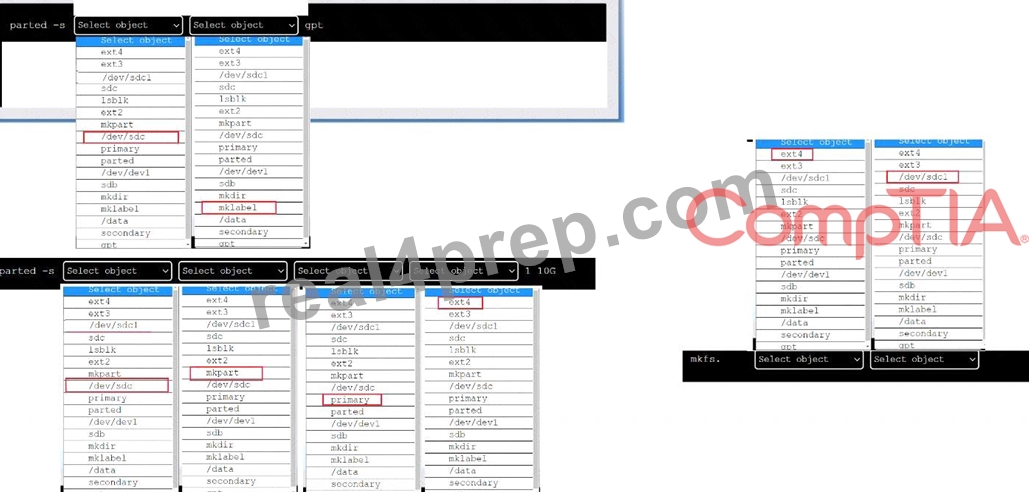
To create an appropriate device label, format and create an ext4 file system on the new partition, you can use the following commands:
To create a GPT (GUID Partition Table) label on the new drive /dev/sdc, you can use the parted command with the -s option (for script mode), the device name (/dev/sdc), the mklabel command, and the label type (gpt). The command is:
parted -s /dev/sdc mklabel gpt
To create a primary partition of 10 GB on the new drive /dev/sdc, you can use the parted command with the -s option, the device name (/dev/sdc), the mkpart command, the partition type (primary), the file system type (ext4), and the start and end points of the partition (1 and 10G). The command is:
parted -s /dev/sdc mkpart primary ext4 1 10G
To format and create an ext4 file system on the new partition /dev/sdc1, you can use the mkfs command with the file system type (ext4) and the device name (/dev/sdc1). The command is:
mkfs.ext4 /dev/sdc1
You can verify that the new partition and file system have been created by using the lsblk command, which will list all block devices and their properties.
NEW QUESTION # 27
A systems administrator is tasked with creating a cloud-based server with a public IP address.
Which of the following technologies did the systems administrator use to complete this task?
- A. Terraform
- B. Ansible
- C. Puppet
- D. Git
Answer: A
Explanation:
Explanation
The systems administrator used Terraform to create a cloud-based server with a public IP address. Terraform is a tool for building, changing, and versioning infrastructure as code. Terraform can create and manage resources on different cloud platforms, such as AWS, Azure, or Google Cloud. Terraform uses a declarative syntax to describe the desired state of the infrastructure and applies the changes accordingly. Terraform can also assign a public IP address to a cloud server by using the appropriate resource attributes. This is the correct technology that the systems administrator used to complete the task. The other options are incorrect because they are either not designed for creating cloud servers (Puppet or Git) or not capable of assigning public IP addresses (Ansible). References: CompTIA Linux+ (XK0-005) Certification Study Guide, Chapter 19:
Managing Cloud and Virtualization Technologies, page 559.
NEW QUESTION # 28
At what point is the Internal Certificate Authority (ICA) created?
- A. When an administrator decides to create one.
- B. Upon creation of a certificate.
- C. During the primary Security Management Server installation process.
- D. When an administrator initially logs into SmartConsole.
Answer: C
NEW QUESTION # 29
In order to copy data from another VLAN, a systems administrator wants to temporarily assign IP address
10.0.6 5/24 to the newly added network interface enp1s0f1. Which of the following commands should the administrator run to achieve the goal?
- A. nmcli conn add lpv4.address-10.0.6.5/24 ifname enpls0f1
- B. ifconfig 10.0.6.5/24 enpsIs0f1
- C. echo "IPV4_ADDRESS=10.0.6.5/24" > /etc/sysconfig/network-scripts/ifcfg-enplsOfl
- D. ip addr add 10.0.6.5/24 dev enpls0f1
Answer: D
Explanation:
Explanation
The command ip addr add 10.0.6.5/24 dev enp1s0f1 will achieve the goal of temporarily assigning IP address
10.0.6.5/24 to the newly added network interface enp1s0f1. The ip command is a tool for managing network interfaces and routing on Linux systems. The addr option specifies the address manipulation mode.
The add option adds a new address to an interface. The 10.0.6.5/24 is the IP address and the subnet mask in CIDR notation. The dev option specifies the device name. The enp1s0f1 is the name of the network interface.
The command ip addr add 10.0.6.5/24 dev enp1s0f1 will add the IP address 10.0.6.5/24 to the network interface enp1s0f1, which will allow the administrator to copy data from another VLAN. This is the correct command to use to achieve the goal. The other options are incorrect because they either do not add a new address to an interface (echo "IPV4_ADDRESS=10.0.6.5/24" >
/etc/sysconfig/network-scripts/ifcfg-enp1s0f1 or ifconfig 10.0.6.5/24 enp1s0f1) or do not use the correct syntax for the command (nmcli conn add ipv4.address-10.0.6.5/24 ifname enp1s0f1 instead of nmcli conn add type ethernet ipv4.address 10.0.6.5/24 ifname enp1s0f1). References: CompTIA Linux+ (XK0-005) Certification Study Guide, Chapter 12: Managing Network Connections, page 385.
NEW QUESTION # 30
A systems administrator is receiving tickets from users who cannot reach the application app that should be listening on port 9443/tcp on a Linux server.
To troubleshoot the issue, the systems administrator runs netstat and receives the following output:
Based on the information above, which of the following is causing the issue?
- A. The application is listening on port 1234.
- B. The application is not running.
- C. The application is listening on the loopback interface.
- D. The IP address 0.0.0.0 is not valid.
Answer: C
Explanation:
Explanation
The server is in a "Listen" state on port 9943 using its loopback address. The "1234" is a process-id The cause of the issue is that the application is listening on the loopback interface. The loopback interface is a virtual network interface that is used for internal communication within the system. The loopback interface has the IP address 127.0.0.1, which is also known as localhost. The netstat output shows that the application is listening on port 9443 using the IP address 127.0.0.1. This means that the application can only accept connections from the same system, not from other systems on the network. This can prevent the users from reaching the application and cause the issue. The administrator should configure the application to listen on the IP address 0.0.0.0, which means all available interfaces, or on the specific IP address of the system that is reachable from the network. This will allow the application to accept connections from other systems and resolve the issue. The cause of the issue is that the application is listening on the loopback interface. This is the correct answer to the question. The other options are incorrect because they are not supported by the outputs.
The IP address 0.0.0.0 is valid and means all interfaces, the application is not listening on port 1234, and the application is running as shown by the process ID 1234. References: CompTIA Linux+ (XK0-005) Certification Study Guide, Chapter 12: Managing Network Connections, page 383.
NEW QUESTION # 31
A systems administrator needs to reconfigure a Linux server to allow persistent IPv4 packet forwarding.
Which of the following commands is the correct way to accomplish this task?
- A. firewall-cmd --enable ipv4_forwarding
- B. echo 1 > /proc/sys/net/ipv4/ipv_forward
- C. sysctl -w net.ipv4.ip_forward=1
- D. systemctl start ipv4_forwarding
Answer: C
Explanation:
Explanation
The command sysctl -w net.ipv4.ip_forward=1 enables IPv4 packet forwarding temporarily by setting the kernel parameter net.ipv4.ip_forward to 1. To make this change persistent, the administrator needs to edit the file /etc/sysctl.conf and add the line net.ipv4.ip_forward = 1. The other options are incorrect because they either use the wrong file (/proc/sys/net/ipv4/ipv_forward), the wrong command (firewall-cmd or systemctl), or the wrong option (--enable or start). References: CompTIA Linux+ (XK0-005) Certification Study Guide, Chapter 12: Managing Network Connections, page 378.
NEW QUESTION # 32
A Linux administrator cloned an existing Linux server and built a new server from that clone. The administrator encountered the following error after booting the cloned server:
The administrator performed the commands listed below to further troubleshoot and mount the missing filesystem:
Which of the following should administrator use to resolve the device mismatch issue and mount the disk?
- A. fsck -A
- B. mount disk by-blkid
- C. mount disk by device-id
- D. mount disk by-label
Answer: C
Explanation:
Explanation
The administrator should use the command mount disk by device-id to resolve the device mismatch issue and mount the disk. The issue is caused by the cloned server having a different device name for the disk than the original server. The output of blkid shows that the disk has the device name /dev/sdb1 on the cloned server, but the output of cat /etc/fstab shows that the disk is expected to have the device name /dev/sda1. The command mount disk by device-id will mount the disk by using its unique identifier (UUID) instead of its device name. The UUID can be obtained from the output of blkid or lsblk -f. The command will mount the disk to the specified mount point (/data) and resolve the issue. The other options are incorrect because they either do not mount the disk (fsck -A), do not use the correct identifier (mount disk by-label or mount disk by-blkid), or do not exist (mount disk by-blkid). References: CompTIA Linux+ (XK0-005) Certification Study Guide, Chapter 10: Managing Storage, pages 318-319.
NEW QUESTION # 33
A server is experiencing intermittent connection issues. Some connections to the Internet work as intended, but some fail as if there is no connectivity. The systems administrator inspects the server configuration:
Which of the following is MOST likely the cause of the issue?
- A. The ARP table contains incorrect entries.
- B. An internal-only DNS server is configured.
- C. Two default routes are configured.
- D. The IP netmask is wrong for ens3.
Answer: C
Explanation:
Explanation
The most likely cause of the issue is that two default routes are configured on the server. The default route is the route that is used when no other route matches the destination of a packet. The default route is usually the gateway that connects the local network to the Internet. The server configuration shows that there are two default routes in the routing table, one with the gateway 192.168.1.1 and the other with the gateway 10.0.0.1.
This can cause a conflict and confusion for the server when deciding which gateway to use for the outgoing packets. Some packets may be sent to the wrong gateway and fail to reach the Internet, while some packets may be sent to the correct gateway and work as intended. This can result in intermittent connection issues and inconsistent behavior. The administrator should remove one of the default routes and keep only the correct one for the network. This can be done by using the ip route del command or by editing the network configuration files. This will resolve the issue and restore the connectivity. The other options are incorrect because they are not supported by the outputs. The DNS server, the IP netmask, and the ARP table are not the causes of the issue. References: CompTIA Linux+ (XK0-005) Certification Study Guide, Chapter 12: Managing Network Connections, pages 381-382.
NEW QUESTION # 34
A Linux administrator has physically added a new RAID adapter to a system. Which of the following commands should the Linux administrator run to confirm that the device has been recognized? (Select TWO).
- A. Ishw -class disk
- B. pvdisplay
- C. Is -11 /etc
- D. dmesg
- E. rmmod
- F. rmdir /dev
Answer: A,D
Explanation:
Explanation
The following commands can help you confirm that the new RAID adapter has been recognized by the Linux system:
dmesg: This command displays the kernel messages, which can show the information about the newly detected hardware device. You can use dmesg | grep -i raid to filter the output for RAID-related messages.
lshw -class disk: This command lists the disk devices on the system, including the RAID controller and its model name. You can use lshw -class disk | grep -i raid to filter the output for RAID-related information1.
The other commands are not relevant for this purpose. For example:
rmmod: This command removes a module from the Linux kernel, which is not useful for detecting a new device.
ls -l /etc: This command lists the files and directories in the /etc directory, which is not related to hardware devices.
pvdisplay: This command displays the attributes of physical volumes, which are part of the logical volume management (LVM) system, not the RAID system.
rmdir /dev: This command removes an empty directory, which is not helpful for detecting a new device.
Moreover, /dev is a special directory that contains device files, and should not be removed.
NEW QUESTION # 35
A Linux administrator is alerted to a storage capacity issue on a server without a specific mount point or directory. Which of the following commands would be MOST helpful for troubleshooting? (Choose two.)
- A. dd
- B. fdisk
- C. ls
- D. mount
- E. parted
- F. du
- G. df
Answer: F,G
Explanation:
Explanation
To troubleshoot a storage capacity issue on a server without a specific mount point or directory, two commands that would be most helpful are df and du. The df command displays information about disk space usage on all mounted filesystems, including their size, used space, available space, and percentage of usage.
The du command displays disk space usage by files and directories in a given path, which can help identify large files or directories that may be taking up too much space. The other commands are incorrect because they either do not show disk space usage, or they are used for other purposes such as partitioning, formatting, checking, mounting, copying, or listing files. References: CompTIA Linux+ Study Guide, Fourth Edition, page 417-419.
NEW QUESTION # 36
A systems administrator created a new Docker image called test. After building the image, the administrator forgot to version the release. Which of the following will allow the administrator to assign the v1 version to the image?
- A. docker image version test:v1
- B. docker image tag test test:vl
- C. docker image save test test:v1
- D. docker image build test:vl
Answer: B
Explanation:
The docker image tag test test:v1 command can be used to assign the v1 version to the image called test. This command creates a new tag for the existing image, without changing the original image. The docker image save test test:v1 command would save the image to a file, not assign a version. The docker image build test:vl command is invalid, as vl is not a valid version number. The docker image version test:v1 command does not exist. Reference: [CompTIA Linux+ (XK0-005) Certification Study Guide], Chapter 16: Virtualization and Cloud Technologies, page 500.
NEW QUESTION # 37
......
XK0-005 Practice Exam and Study Guides - Verified By Prep4away: https://prep4sure.real4prep.com/XK0-005-exam.html